Connecting a VDC-200 to Dual 25-pin and 9-pin Serial Ports
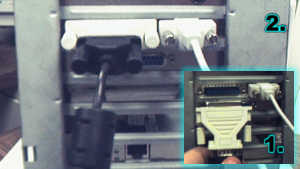
Connect the camera's RS-232 cable to the 9-pin serial port (if available). If the 9-pin port is being used by the mouse as illustrated, then connect the cable to a 9-pin to 25-pin adapter.
Connect the adapter to the 25-pin serial port and tighten the screws.
NOTE: A 25-pin serial port is "male" meaning that it has pins sticking out of it that make the connection. This is not to be confused with a parallel printer port, which is "female" and has holes to accept the pins.
If the mouse is using the 9-pin serial port, the camera's RS-232 cable can be attached to the 25-pin serial cable with a 9-pin to 25-pin gender changer. These can be found at many computer retailers.